Thinking about launching your own E-learning website but don’t know where to start? You’re in the right place! With WordPress, creating a sleek, fully functional online learning platform is easier than ever. Whether you’re an educator, coach, or entrepreneur, this guide will walk you through everything—from must-have features to step-by-step setup methods (both free and premium). Let’s get started!
???? Table of Contents
- Key Features Every E-learning website Should Have
- How to Create an E-learning website Using WordPress
- SEO & Marketing Strategies for Your E-learning website
- Final Thoughts
- Best Plugins & Tools for E-learning websites
Key Features Every E-learning website Should Have
1. User-Friendly Design & Navigation in E-learning website
No one likes a confusing website. Make sure your E-learning platform has a clean layout, intuitive navigation, and mobile-friendly design so learners can easily browse through courses, sign up, and start learning.
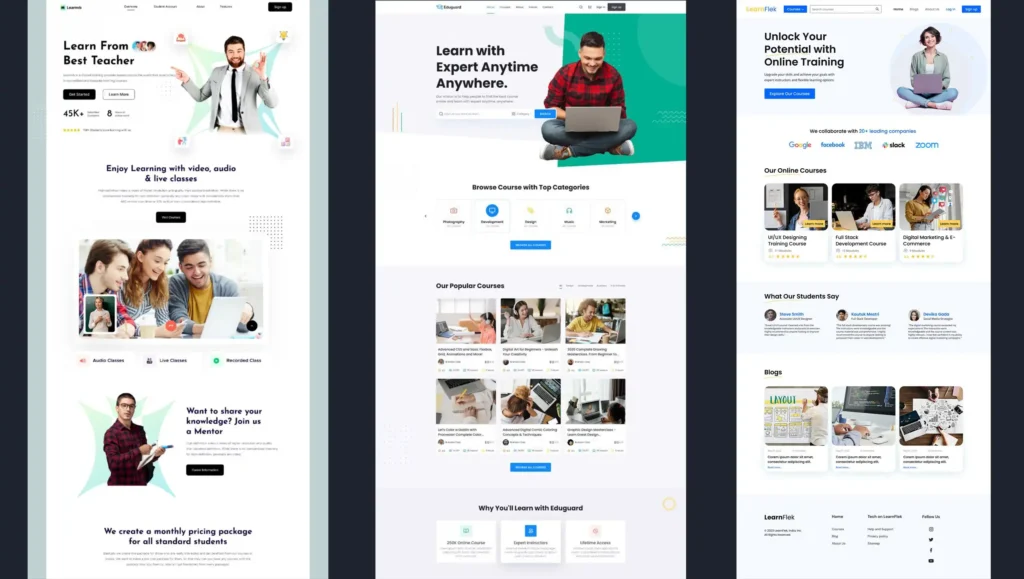
???? Case Study: Udemy is a perfect example of a well-structured E-learning site. It categorizes courses neatly, has a powerful search bar, and provides recommendations based on user behavior.
2. A Powerful Learning Management System (LMS) to E-learning website
Your LMS is the core of your E-learning site. A good LMS allows you to:
- Create and manage courses effortlessly
- Add multimedia content (videos, PDFs, quizzes)
- Track student progress
- Offer certificates upon completion
???? Case Study: Coursera successfully integrates LMS features, allowing universities and companies to host professional courses with progress tracking and certification.
3. Mobile Optimization for E-learning website
Did you know that over 50% of internet traffic comes from mobile devices? Your E-learning websites must be mobile-friendly to keep up with today’s learners.

Source: Freepik
???? Case Study: Duolingo has mastered mobile optimization, offering a seamless learning experience across devices, making education accessible anywhere, anytime.
4. Secure Payment Gateways
Planning to sell courses? Integrate trusted payment gateways like PayPal, Stripe, or WooCommerce Payments to ensure seamless and secure transactions.
???? Case Study: MasterClass offers premium courses with smooth payment integrations, enabling one-time purchases and subscriptions effortlessly.
5. Engaging & Interactive Learning Experiences
Your content should be more than just text! Incorporate:
- Video lessons ????
- Quizzes & interactive exercises ????
- Downloadable resources ????
- Gamification (badges, leaderboards, rewards) ????️
???? Case Study: Khan Academy keeps learners engaged through video-based tutorials, interactive quizzes, and progress-tracking dashboards.

Get Connected To us and Take your business to the next level.
Our highly experienced tech development team is one call away from you!
6. SEO & Marketing Features
If you want Google to rank your website, you need strong SEO. That means:
- Keyword-rich content (e.g., “E-learning websites with WordPress”)
- Fast load speeds (no one likes a slow site!)
- Optimized images & videos
- Internal linking for easy navigation
???? Case Study: Skillshare dominates search results with strong SEO, user-generated content, and an effective blogging strategy to drive organic traffic.
How to Create an E-learning website Using WordPress

Free Method Using WordPress & Free Plugins
Starting an E-learning site for free? No problem! WordPress + free LMS plugins make it easy to get up and running.
Step-by-Step Guide to a Free E-learning website:
- Get a Domain & Hosting:
- Use InfinityFree (free) or affordable hosting like Bluehost.
- Install WordPress:
- One-click installation available with most hosting providers.
- Choose a Free LMS Plugin:
- Install LearnPress.
- Set up your courses, lessons, and quizzes.
- Pick a Free E-learning Theme:
- Great options: Astra, Tutor LMS Starter, Education WP.
- Optimize for Speed & SEO:
- Install Yoast SEO for better rankings.
- Use WP Super Cache for faster load times.
GET IN TOUCH WITH OUR TEAM
Schedule a Meeting
Premium Method for a Professional E-learning website
Want to create a high-end, feature-packed E-learning website? Investing in premium plugins and hosting is worth it.
Steps to Build a Premium E-learning Platform:
- Get a Premium Hosting & Domain
- Best choices: SiteGround or Kinsta.
- Use a Premium LMS Plugin:
- LearnDash – Most powerful option for large-scale courses.
- Tutor LMS Pro – User-friendly with drag-and-drop features.
- Choose a High-Quality E-learning Theme:
- Best picks: Eduma, Academy Pro, MasterStudy.
- Set Up Membership & Payment Systems:
- Use WooCommerce for selling courses.
- MemberPress for subscription-based access.
- Marketing & SEO Optimization:
- Use ConvertKit for email marketing.
- Track visitors with Google Analytics.
- Add chatbots for better student engagement.
SEO & Marketing Strategies for Your E-learning website
- Target long-tail keywords (e.g., “Best WordPress E-learning website for beginners”).
- Write in-depth blog posts to rank for more keywords.
- Optimize for Google’s Core Web Vitals (site speed, responsiveness, user experience).
- Use email marketing to convert visitors into students.
- Leverage social proof (testimonials, student success stories).
- Run social media campaigns to attract more learners.
Get Connected To us and Take your business to the next level.
Our highly experienced tech development team is one call away from you!
Best Plugins & Tools for E-learning website
- LearnDash – Best premium LMS plugin.
- Tutor LMS – Affordable and user-friendly.
- MemberPress – Great for memberships.
- WooCommerce – Sell courses with ease.
- Yoast SEO – Improve search rankings.
- WP Rocket – Speed up your website.
Final Thoughts
Creating an E-learning websites with WordPress isn’t just about throwing up some courses—it’s about crafting an engaging, professional, and SEO-optimized platform that attracts students and keeps them coming back.
Ready to build yours? Pick your method—free or premium—and start shaping the future of online education today! ????