When starting or scaling a business, one of the first decisions you will face is choosing the best CMS for business. The right Content Management System (CMS) can significantly impact the speed, functionality, and overall success of your website. Two of the most popular CMS options available are WordPress and custom-built CMS solutions. While WordPress powers over 40% of all websites globally, custom CMS solutions offer a high degree of flexibility and tailored functionality.
In this post, we’ll compare WordPress and custom CMS solutions, discussing their advantages, disadvantages, and which one might be the best fit for your business needs in 2025.
Content Overview Box
Content Overview:
In this article, we will explore two of the most widely used content management systems—WordPress and Custom CMS solutions. The key points we will cover are:
- WordPress Overview: Understand why WordPress is a popular choice for businesses, especially small to medium-sized ones.
- Advantages & Disadvantages: Compare the strengths and limitations of WordPress versus custom-built solutions.
- Custom CMS Solutions: Discover the flexibility and scalability of custom CMS for businesses with unique needs.
- SEO Best Practices: Learn how to optimize your website using both WordPress and Custom CMS with AI integration.
- Decision Making: Guidance on choosing the best CMS for your business based on your growth needs, industry, and technical requirements.
What is a CMS?
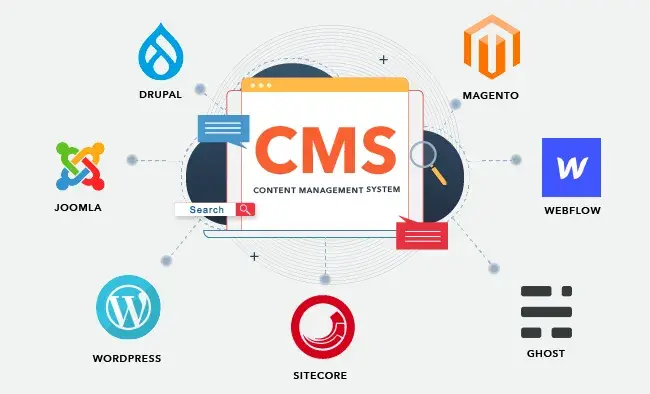
Before we dive deeper into the comparison, let’s first define what a Content Management System (CMS) is. A CMS is a platform that allows businesses to create, manage, and modify content on their website without requiring technical coding knowledge. It simplifies the web development process and enables companies to maintain a dynamic and user-friendly website.
WordPress: The Popular CMS for Business Websites
WordPress is a leading open-source CMS platform widely used across the globe. It’s ideal for businesses that want a quick, budget-friendly solution to get their website up and running. Let’s explore its advantages and disadvantages.
Advantages of WordPress
- User-Friendly Interface
WordPress is well-known for its ease of use. With an intuitive interface, WordPress is perfect for business owners and marketers who don’t have a technical background. You don’t need to know HTML, CSS, or JavaScript to use WordPress effectively, making it accessible to a wider audience. - Extensive Plugin Ecosystem
One of WordPress’s most powerful features is its large collection of plugins. From SEO plugins like Yoast SEO to e-commerce solutions like WooCommerce, WordPress can be customized to meet the unique needs of your business. - SEO-Friendly Out of the Box
WordPress has built-in features and powerful plugins that help optimize your website for search engines. With tools like Yoast SEO, it’s easy to add meta tags, create XML sitemaps, and structure content for better rankings. This makes WordPress one of the most SEO-friendly CMS platforms available. - Large Community & Support
WordPress has a thriving community of developers, designers, and users. This vast network ensures that help is readily available through tutorials, forums, and documentation. Whether you need advice on troubleshooting or tips for better customization, the WordPress community has you covered. - Cost-Effective
WordPress is free to use as it is an open-source CMS. You will only need to pay for premium themes, plugins, and hosting. For businesses looking to keep costs low, WordPress offers a very affordable option.
GET IN TOUCH WITH OUR TEAM
Schedule a Meeting
Disadvantages of WordPress
- Limited Flexibility for Complex Requirements
While WordPress is incredibly versatile, it might not be the best choice for businesses with complex needs. For example, if you require specific custom functionality or integrations, WordPress may require additional plugins, which can sometimes lead to bloat and slower site performance. - Security Concerns
Due to its popularity, WordPress is a prime target for hackers. Although security plugins and updates help mitigate risks, businesses need to be proactive in ensuring their site remains secure. - Not Ideal for Highly Custom Workflows
WordPress may not be the best fit for businesses with very specific, custom workflows or unique technical needs. In such cases, a custom CMS solution may offer a better fit.
Custom CMS Solutions: Customized for Your Business
Custom CMS solutions are designed and developed specifically for your business. Unlike WordPress, which uses standardized themes and plugins, a custom CMS allows you to build a system from scratch, tailoring it to your exact specifications. Here are the advantages and disadvantages.
Advantages of Custom CMS Solutions
- Complete Customization
A custom CMS is built to your exact specifications. You have full control over the design, functionality, and features of your website. Whether you need custom workflows, data handling, or unique integrations, a custom CMS can meet these needs. - Scalability
Custom CMS solutions are ideal for businesses that are expecting growth or require a scalable website. Unlike WordPress, which may struggle with high-traffic demands as your business grows, a custom CMS is designed to scale with your needs. - Optimized Performance
A custom CMS can be tailored to optimize performance. This means faster load times, better user experience, and reduced overhead compared to general-purpose platforms like WordPress. - Enhanced Security
Since custom CMS solutions are built specifically for your business, they are often more secure. There are fewer vulnerabilities compared to WordPress, which is frequently targeted by hackers due to its widespread usage. - Seamless Integration with Existing Systems
Custom CMS solutions can be seamlessly integrated with your business’s other tools and platforms, such as customer databases or enterprise software systems, ensuring smooth operations across all areas of your business.

Get Connected To us and Take your business to the next level.
Our highly experienced tech development team is one call away from you!
Disadvantages of Custom CMS Solutions
- Higher Initial Cost
Building a custom CMS from scratch is costly. Unlike WordPress, which is free, custom CMS solutions require a significant investment in terms of development time and money. Businesses need to plan accordingly for the upfront costs. - Longer Development Time
A custom CMS takes longer to develop compared to WordPress. If you need a website quickly, WordPress might be the better option. - Smaller Developer Pool
Unlike WordPress, which has a large community of developers, custom CMS solutions require specialized expertise. Finding developers for ongoing maintenance and updates may be more challenging.
WordPress vs Custom CMS: Deciding the Best CMS for Business
When to Choose WordPress
- For Small to Medium-Sized Businesses: WordPress is a great option for businesses that need a simple, cost-effective solution. It’s ideal for businesses that don’t have complex requirements but still want a professional website.
- For SEO & Content-Driven Websites: If SEO is a priority, WordPress is an excellent choice due to its built-in SEO features and the availability of plugins like Yoast SEO.
- For E-commerce: If your business requires an online store, WordPress with WooCommerce is a popular and cost-effective solution.
GET IN TOUCH WITH OUR TEAM
Schedule a Meeting
When to Choose a Custom CMS
- For Large Businesses or Enterprises: If your business requires highly specific functionality or you’re planning for rapid growth, a custom CMS will provide the scalability and customization you need.
- For Unique Branding or Custom Workflows: Custom CMS is ideal for businesses that need unique features or workflows that cannot be easily achieved with WordPress.
- For Enhanced Security: Businesses that handle sensitive customer data or require high levels of security may benefit more from a custom CMS built with specific security measures in mind.
How AI Enhances CMS Functionality
In 2025, AI is revolutionizing how businesses use both WordPress and custom CMS solutions. Here’s how:
- AI-Powered Content Creation: AI can assist in generating content ideas, writing articles, and even optimizing content for SEO. WordPress plugins like RankMath and others make this possible with AI-driven insights.
- Personalized User Experience: AI can be used to create personalized experiences for website visitors by analyzing their behavior and delivering tailored content, products, and services.
- SEO Optimization with AI: AI can automate SEO tasks such as keyword analysis, content suggestions, and competitor insights, making it easier to optimize your website for search engines.
- Enhanced Security: AI can monitor website traffic for suspicious activity, providing real-time alerts and preventing potential threats.
Conclusion
Choosing the best CMS for business depends on your specific needs, technical capabilities, and growth projections. WordPress is ideal for businesses that need a quick, affordable, and easy-to-use solution, especially if SEO and content management are key priorities. On the other hand, custom CMS solutions provide more flexibility, scalability, and security, making them ideal for larger businesses or those with specific technical needs.
By understanding the advantages and drawbacks of both options, you can make an informed decision about which CMS platform will help your business succeed in 2025 and beyond.