A well-designed E-commerce Website is the cornerstone of online success. For WooCommerce store owners, merging intuitive UI/UX with SEO best practices can skyrocket conversions and organic visibility. In this guide, we’ll break down actionable strategies to optimize your ecommerce website for both users and search engines.
Content List:
- Clean & Minimalistic Design for Ecommerce Websites
- Fast & SEO-Friendly Performance
- Mobile-First Optimization for Ecommerce Sites
- Intuitive Navigation & Search
- High-Quality Visuals for Product Trust
- Persuasive, SEO-Optimized Descriptions
- Seamless Checkout for Higher Conversions
- Trust Signals to Reduce Cart Abandonment
- Personalization & AI-Driven Recommendations
- Live Chat for Customer Retention
1. Clean & Minimalistic Design for E-commerce Websites
Why It Matters for SEO & UX
A clutter-free design enhances user engagement, reduces bounce rates, and encourages conversions. Search engines like Google prioritize websites that provide a seamless experience, making clean layouts essential for better rankings.


Key SEO & UX Benefits
- Faster loading times improve Core Web Vitals scores.
- Simple navigation enhances usability, reducing frustration.
- Intuitive layouts increase time on site and conversions.
Best Practices for a Minimalist E-commerce Website Layout
Whitespace Utilization
- Use whitespace effectively to draw attention to key elements like CTAs (“Buy Now,” “Add to Cart”).
- Avoid overcrowding—let products stand out on category pages.
Color Scheme & Branding
- Align colors with your brand identity. For example, eco-friendly brands often use greens, while luxury brands may prefer black and gold.
- Ensure high contrast for readability and accessibility compliance.
Mobile-First & Responsive Design
- Optimize layouts for mobile users, as Google prioritizes mobile-friendly websites.
- Use a sticky navigation bar for quick access to categories and the shopping cart.
Typography & Readability
- Use legible fonts and consistent text sizes for a smooth reading experience.
- Limit font styles to two or three to maintain consistency and professionalism.
Pro Tip
Keep your homepage and product pages lightweight by minimizing heavy images and unnecessary scripts. Use optimized images and lazy loading to improve page speed, which directly impacts SEO rankings and user experience.
2. Fast & SEO-Friendly Performance
Why It Matters
Page speed is a critical ranking factor for e-commerce websites. Google prioritizes fast-loading sites, and a slow website can lead to lost sales. Studies show that 53% of users abandon a site if it takes longer than three seconds to load (Google, 2023). Faster websites enhance user experience, reduce bounce rates, and improve conversion rates.
Key SEO & UX Benefits
- Improved rankings on search engines.
- Higher conversion rates due to faster page load times.
- Lower bounce rates, keeping users engaged.
Best Practices for a High-Performance E-commerce Website
Optimize Images Efficiently
- Use next-gen image formats like WebP instead of JPEG/PNG.
- Compress images with tools like ShortPixel or TinyPNG.
- Implement lazy loading so images load only when visible on the screen.
(Recommended tools: ShortPixel, Photopea).
Leverage Caching and Content Delivery Networks (CDNs)
- Install caching plugins like WP Rocket to store static assets and speed up load times.
- Use a CDN like Cloudflare or BunnyCDN to distribute content globally, reducing latency.
Minimize Code & Reduce Server Requests
- Enable Gzip or Brotli compression to shrink file sizes.
- Minify CSS, JavaScript, and HTML using plugins like Autoptimize.
- Reduce unnecessary scripts and third-party tracking codes.
Audit & Improve Performance Regularly
- Test speed with Google PageSpeed Insights and GTmetrix.
- Identify bottlenecks and optimize accordingly.
- Monitor Core Web Vitals (Largest Contentful Paint, First Input Delay, Cumulative Layout Shift).
Pro Tip
Choose a high-performance hosting provider with built-in caching and SSD storage, such as Kinsta or Cloudways. A reliable hosting service significantly improves loading speed and SEO performance.
3. Mobile-First Optimization for E-commerce Websites
Why It Matters
Google prioritizes mobile-first indexing, meaning it primarily uses the mobile version of a website for ranking and indexing. With over 60% of e-commerce traffic coming from mobile devices, optimizing for mobile is no longer optional—it’s essential for SEO and conversions.

Source: Pixabay
Key SEO & UX Benefits
- Higher rankings on Google due to mobile-first indexing.
- Improved user experience, leading to higher conversion rates.
- Reduced cart abandonment by streamlining mobile navigation and checkout.
Best Practices for Mobile Optimization
Test & Improve Mobile Responsiveness
- Use Google’s Mobile-Friendly Test to identify issues.
- Ensure fast loading speeds with optimized images and minimal scripts.
- Implement a thumb-friendly design with large buttons and easy navigation.
Simplify Mobile Checkout
- Reduce form fields to minimize friction in the purchase process.
- Enable guest checkout to speed up transactions.
- Offer multiple payment options like Apple Pay, Google Pay, and PayPal.
Use Accelerated Mobile Pages (AMP) for Blogs
- Implement AMP to improve page speed and mobile SEO.
- AMP pages load faster, reducing bounce rates and improving rankings.
Pro Tip
Use a progressive web app (PWA) for your e-commerce site. PWAs offer a fast, app-like experience, work offline, and enhance mobile user engagement, leading to better conversions.
By following these strategies, your mobile e-commerce website will rank higher, load faster, and convert more visitors into customers.
4. Intuitive Navigation & Search on E-commerce Website
Why It Matters
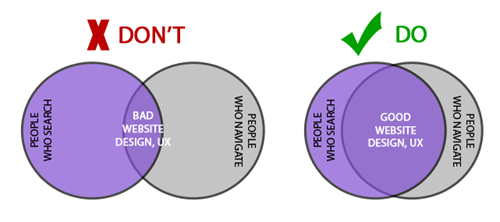
A well-structured e-commerce website improves both user experience (UX) and SEO. A logical site structure helps Google crawl and index product pages efficiently, leading to better rankings. For users, easy navigation ensures they find products quickly, reducing frustration and increasing conversions.
Source: Origin Growth
Key SEO & UX Benefits
- Faster indexing by search engines, improving rankings.
- Enhanced user engagement and lower bounce rates.
- Increased sales by guiding users to relevant products effortlessly.
Best Practices for E-commerce Navigation & Search
Add a Smart Search Bar
- Use an autocomplete search plugin like Searchanise or Doofinder to display instant results.
- Support search by keywords, categories, and product attributes (e.g., size, color, brand).
Implement Breadcrumbs for Clear Navigation
- Use breadcrumb navigation (e.g., Home > Men’s Apparel > T-Shirts) to help users track their path.
- Enable breadcrumbs in Google Search Console for structured data benefits.
Link Related Categories & Products
- Use internal linking to connect relevant categories (e.g., “Shop Running Shoes” links to “Athletic Socks”).
- Add “Customers Also Bought” or “Recommended for You” sections to boost product discovery.
Pro Tip
Organize product categories in a flat, logical hierarchy with a maximum of three clicks to any product page. A clear structure improves both usability and SEO, making it easier for Google and users to find products.
By optimizing navigation and search, your e-commerce website will improve search visibility, enhance user experience, and drive more sales.

Get Connected To us and Take your business to the next level.
Our highly experienced tech development team is one call away from you!
5. High-Quality Visuals for Product Trust on E-commerce Website
Why It Matters
Clear, high-quality images build trust and increase conversion rates on an e-commerce website. Shoppers rely on visuals to make purchasing decisions, and Google prioritizes image-optimized pages in search results.

Source: Welpix
Key SEO & UX Benefits
- Higher rankings in Google Image Search.
- Increased trust and reduced product return rates.
- Better engagement, leading to higher sales.
Best Practices for Optimized Product Images
Use 360-Degree Product Views
- Enable interactive product views using WooCommerce 360 Image to give customers a complete perspective.
- Increase confidence by showcasing products from multiple angles.
Optimize Image Alt Text for SEO
- Use descriptive alt text with keywords (e.g., “blue-leather-handbag-for-women-ecommerce-website”).
- Ensure alt text accurately describes the product for accessibility.
Compress Images Without Losing Quality
- Use tools like ShortPixel or TinyPNG to reduce file sizes while maintaining clarity.
- Convert images to WebP format for faster loading times.
Pro Tip
Use video demos alongside product images to enhance engagement and improve SEO rankings. Pages with video content are 53 times more likely to rank on Google’s first page.
By implementing these best practices, your e-commerce website will attract more traffic, improve user experience, and drive higher conversions.
6. Persuasive, SEO-Optimized Descriptions for your E-commerce Website
Why It Matters
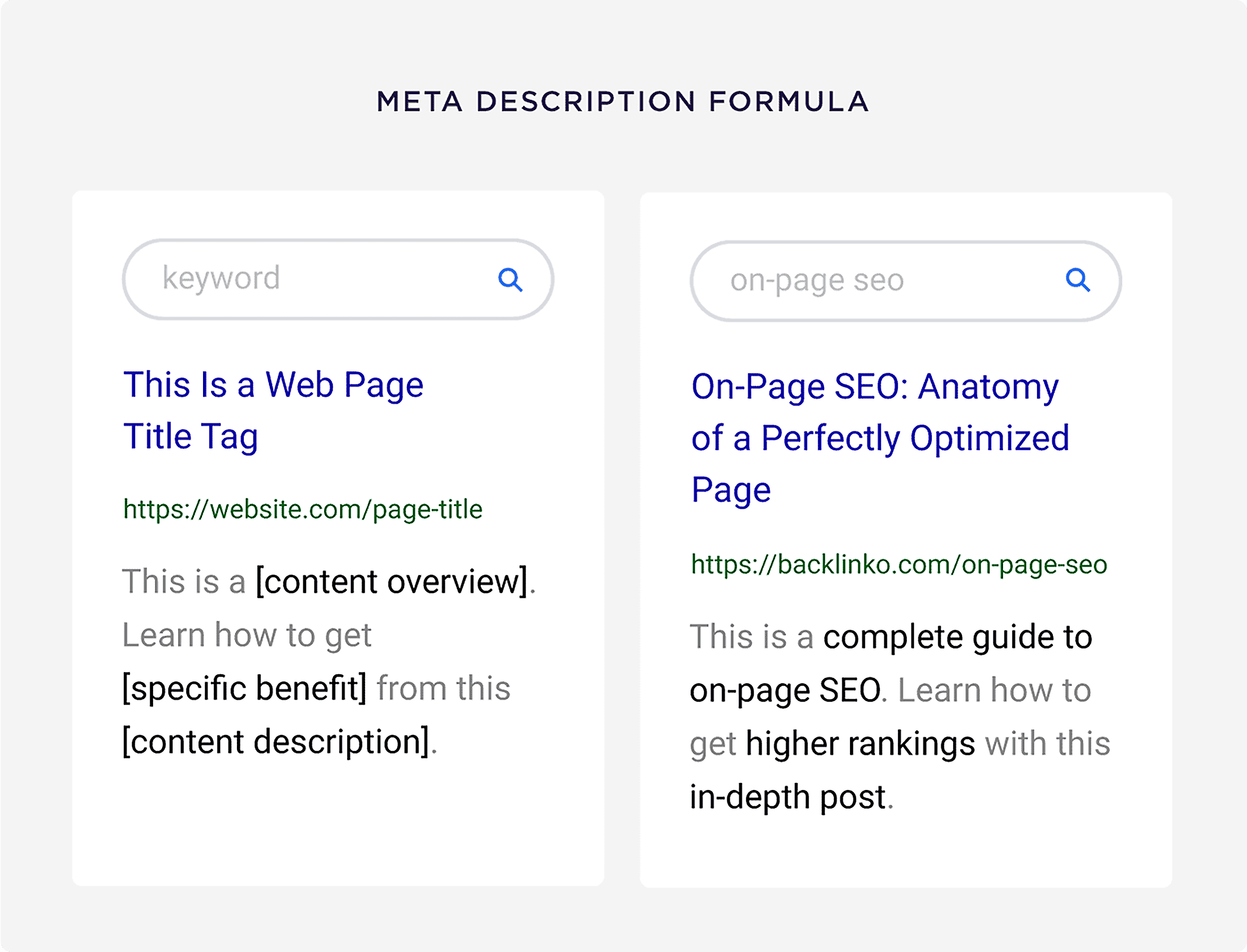
Well-crafted product descriptions serve a dual purpose: they improve e-commerce website SEO by incorporating relevant keywords and persuade buyers to make a purchase. Google ranks product pages based on relevance, and engaging copy increases conversions.
Source: backlinko.com
Key SEO & UX Benefits
- Higher rankings in search results through keyword optimization.
- Increased conversions by addressing customer needs and concerns.
- Better engagement and reduced bounce rates.
Best Practices for Optimized Product Descriptions
Start with Primary Keywords
- Include targeted keywords naturally in the title and first sentence (e.g., “Organic Cotton T-Shirt for Eco-Conscious Shoppers”).
- Avoid keyword stuffing—focus on readability and relevance.
Use Bullet Points for Features & Benefits
- Highlight key product features such as materials, sizing, and unique selling points.
- Emphasize benefits (e.g., “Breathable fabric keeps you cool all day”).
Include FAQs to Target Long-Tail Queries
- Answer common customer questions like “Is this shirt machine washable?” or “What’s the return policy?”
- Structure FAQs using schema markup to improve search visibility (Learn more).
Pro Tip
Add user-generated content such as reviews and testimonials within the product description. Google favors fresh, unique content, and real customer feedback enhances trust and SEO rankings.
By optimizing descriptions with SEO and persuasive writing techniques, your e-commerce website will rank higher, engage more customers, and drive more sales., SEO-Optimized Descriptions
GET IN TOUCH WITH OUR TEAM
Schedule a Meeting
7. Seamless Checkout for Higher Conversions on your E-commerce Website
Why It Matters
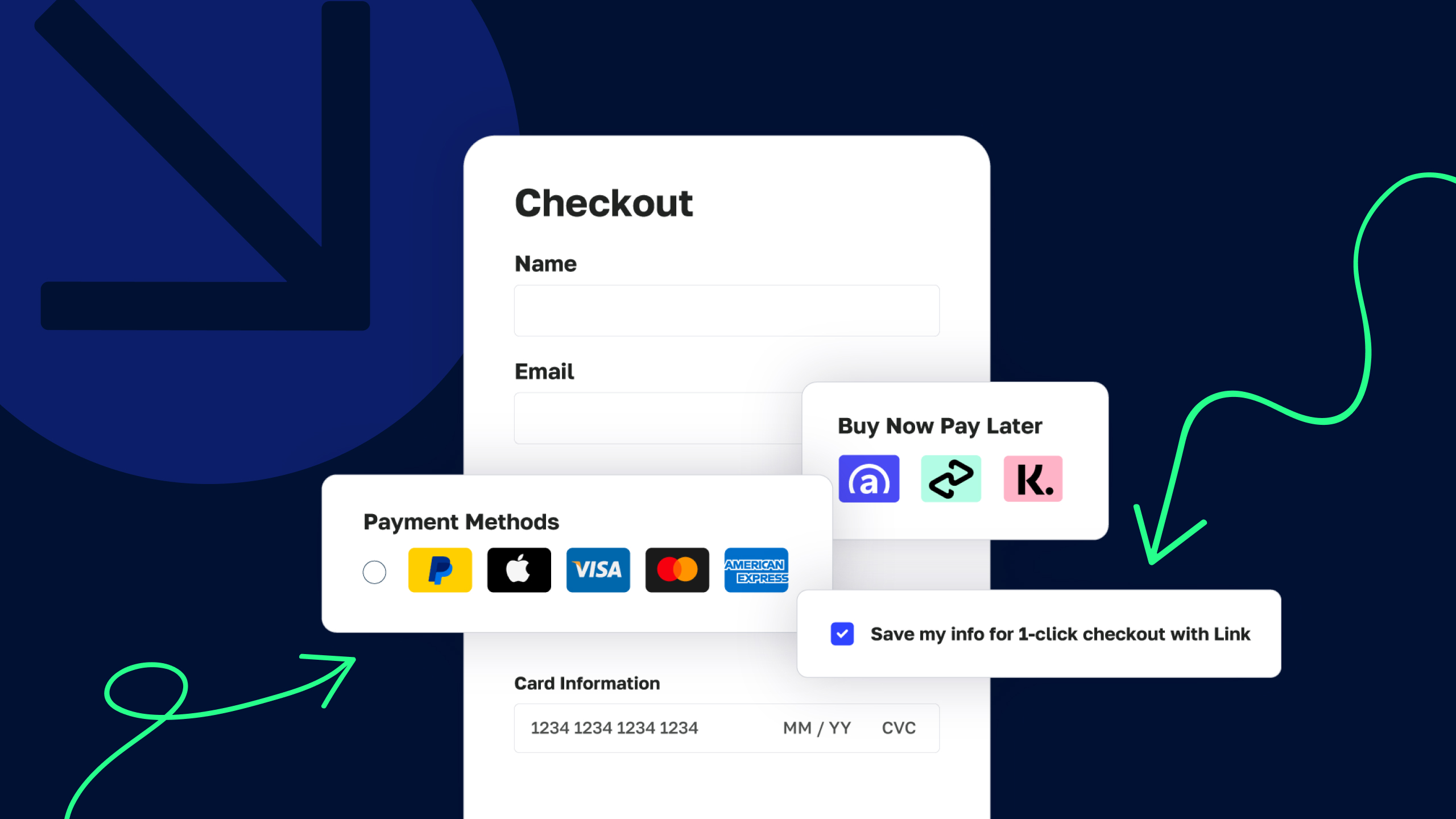
A smooth, hassle-free checkout process minimizes cart abandonment, which averages 69.8% across e-commerce websites (Baymard Institute). Reducing friction at checkout leads to higher conversion rates and better customer satisfaction.
Source: Samcart
Key SEO & UX Benefits
- Lower cart abandonment rates.
- Faster, more convenient purchases.
- Increased trust and repeat customers.
Best Practices for an Optimized Checkout Process
Enable Guest Checkout & Digital Wallets
- Allow users to checkout as guests instead of forcing account creation.
- Offer one-click payment options like Apple Pay, Google Pay, and PayPal.
Add Trust Badges & Security Seals
- Display SSL security badges and payment verification logos to reassure customers.
- Highlight policies like “Money-Back Guarantee” or “Free Returns” for added trust.
Streamline the Checkout Process
- Reduce form fields to only essential information.
- Show a progress bar so users know how many steps remain.
- Auto-fill billing and shipping details for faster checkout.
Pro Tip
Use cart abandonment emails to recover lost sales. Send automated reminders with a limited-time discount to encourage customers to complete their purchase.
By optimizing the checkout experience, your e-commerce website will convert more visitors into buyers, reduce friction, and maximize revenue.
8. Trust Signals to Reduce Cart Abandonment
Why It Matters
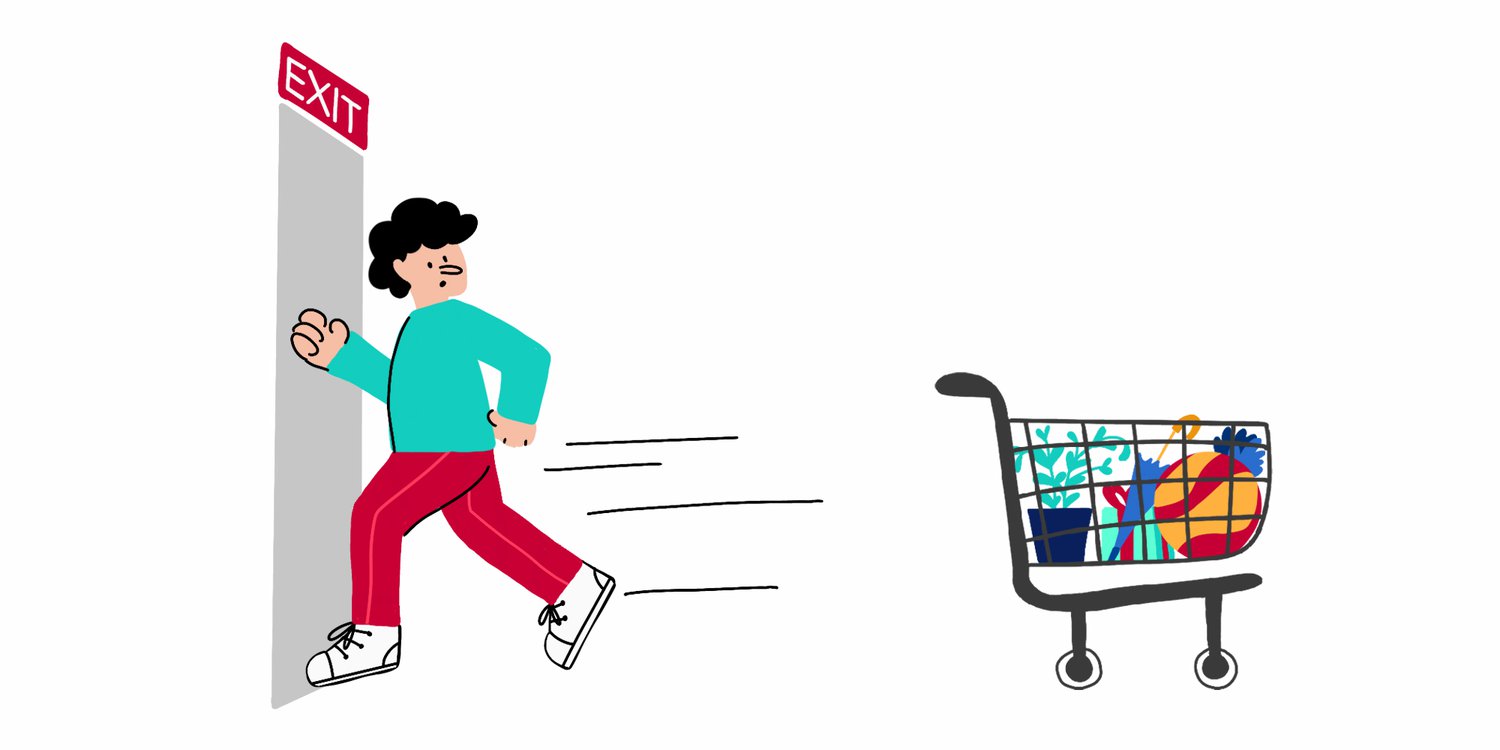
Trust is a key factor in driving conversions. Customers are more likely to complete a purchase if they see credible reviews, ratings, and social proof. Enhancing trust signals reduces cart abandonment, builds confidence, and boosts e-commerce sales.
Source: YourCX
Key SEO & UX Benefits
- Higher click-through rates (CTR) from Google search results via rich snippets.
- Improved credibility, leading to higher conversion rates.
- Reduced cart abandonment by reassuring hesitant buyers.
Best Practices for Building Trust on E-commerce Sites
Display Star Ratings on Product Pages
- Use schema markup to enable rich snippets for product ratings in search results.
- Showcase verified customer reviews to enhance credibility.
Show Real-Time Purchase Notifications
- Use tools like Fomo or TrustPulse to display live sales alerts (e.g., “John from NYC bought this 2 minutes ago”).
- Social proof reassures new customers that others are buying.
Highlight Secure Payments & Guarantees
- Display trust badges (e.g., SSL Secure, Money-Back Guarantee, Free Returns).
- Provide customer service contact options for additional reassurance.
Pro Tip
Encourage user-generated content (UGC) like photo reviews and video testimonials. Authentic customer content not only boosts trust but also improves SEO rankings by keeping product pages fresh and engaging.
By implementing strong trust signals, your e-commerce website will build credibility, reduce abandoned carts, and drive more conversions.
9. Personalization & AI-Driven Recommendations for E-commerce Website
Why It Matters
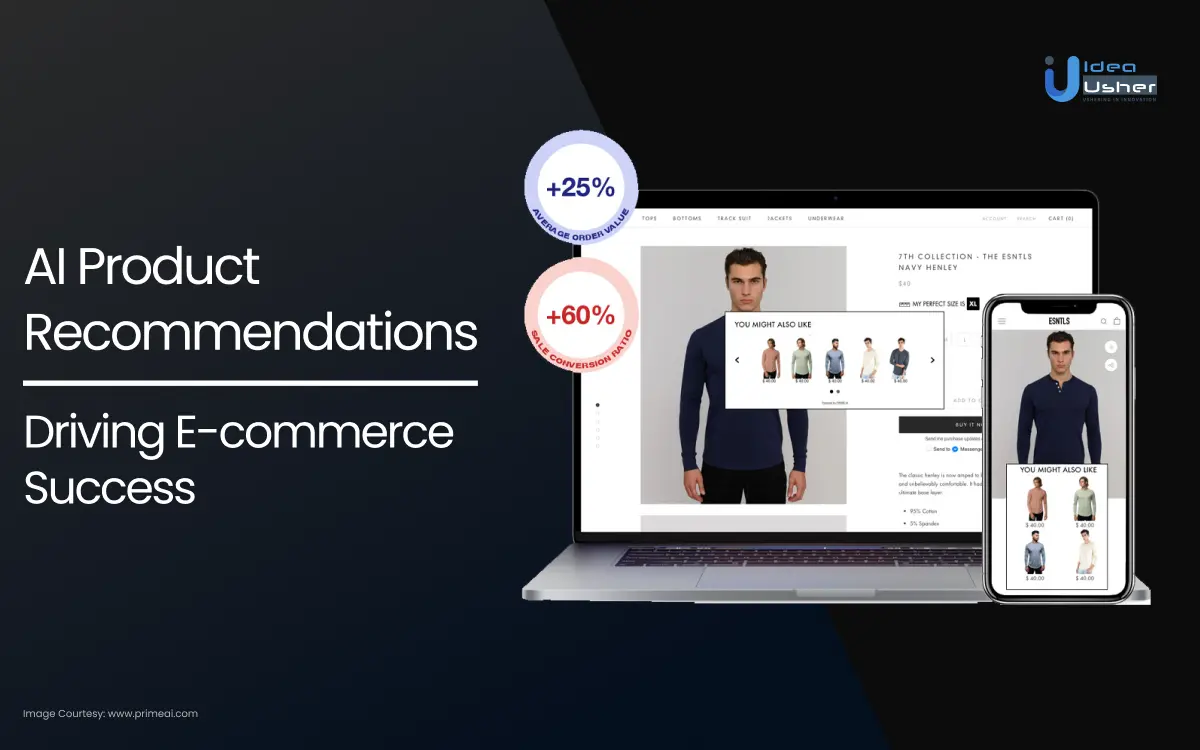
Personalized shopping experiences significantly boost average order value (AOV), with studies showing an increase of 10-15% (McKinsey). Tailored recommendations make customers feel valued, encourage them to explore more products, and ultimately drive higher sales.
Source: ideausher.com
Key SEO & UX Benefits
- Higher conversion rates through targeted product suggestions.
- Increased AOV as customers add more items to their cart.
- Improved customer loyalty by offering a customized shopping experience.
Best Practices for Personalization & AI-Driven Recommendations
Use WooCommerce Product Recommendations
- Leverage the WooCommerce Product Recommendations plugin to suggest related products based on customer behavior, preferences, and purchase history.
- Implement “Customers Also Bought” or “You May Also Like” sections to cross-sell and upsell relevant items.
Segment Users Based on Browsing History
- Track users’ browsing behavior and use this data to segment them into groups (e.g., frequent buyers, first-time visitors).
- Personalize product recommendations, discounts, and content based on their browsing history and past purchases.
Pro Tip
Consider using AI-powered platforms like Recom.ai or Nosto to dynamically personalize product recommendations, improving both the customer experience and your SEO by increasing on-site engagement and reducing bounce rates.
By implementing personalized recommendations, your e-commerce website will increase AOV, enhance customer satisfaction, and improve overall conversion rates.
10. Live Chat for Customer Retention for your E-commerce Website
Why It Matters
Live chat is a powerful tool for customer retention and boosting conversions, with studies showing a 20% increase in conversions (SuperOffice). Offering immediate support builds trust, addresses customer concerns in real time, and guides them through the buying process.
Key SEO & UX Benefits
- Higher conversion rates from instant responses to inquiries.
- Improved customer satisfaction leading to repeat business.
- Lower bounce rates as visitors feel more confident purchasing with direct support.
Best Practices for Live Chat
Use Chatbots for 24/7 Support
- Implement AI-driven chatbots (e.g., Tidio) to offer round-the-clock customer service.
- Automate common inquiries (e.g., order status, shipping info) to ensure instant support, even when agents are offline.
Train Agents to Upsell During Chats
- Train live chat agents to identify upselling opportunities, such as suggesting complementary products or higher-tier items.
- Encourage agents to personalize recommendations based on customer needs during the chat.
Pro Tip
Integrate live chat with your CRM system to provide agents with customer insights, allowing them to offer more relevant, personalized product recommendations during conversations.
By using live chat effectively, your e-commerce website will improve customer engagement, increase conversions, and build long-term relationships with customers.
Final Thoughts
Building a high-converting ecommerce website requires balancing SEO, speed, and user-centric design. By implementing these strategies, your WooCommerce store will rank higher, convert better, and stand out in competitive markets.
Need help auditing your ecommerce website’s SEO? Drop a comment below!
GET IN TOUCH WITH OUR TEAM